
If your band still fights wedge monitors for headroom, a wireless in ear monitor system is the single upgrade that changes the most: every player gets a clean, custom stereo mix directly in their ears, the front-of-house engineer stops chasing feedback, and the stage volume drops to conversation level. In this guide we break down how a wireless IEM system works, what the ACEMIC G5 stereo lineup offers from a single-channel rig to a rack that feeds eight bodypacks at once, and exactly what to check before you buy — no marketing filler, just the decisions that matter on stage.

Why Stage Monitoring Fails Without In-Ears
Wedge monitors are the oldest compromise in live sound. Every wedge added to the stage raises the level the microphones hear, so the engineer pulls the faders down, the vocals get buried, and someone in the band inevitably signals for "more me". The result is a loop: more wedges, more feedback risk, more stage wash bleeding into every open mic, and a front-of-house mix that never gets quiet enough to open up.
Hearing damage is the quieter cost. Players standing next to a drum kit or a guitar cab routinely endure well over 100 dB on stage, night after night. In-ear monitoring physically seals the ear canal, so a comfortable listening level protects long-term hearing while still delivering every cue: click track, count-offs, backing tracks, and the vocal you have been straining to hear since 2019.
Wireless is what makes in-ears practical on a working stage. A wired IEM rig locks one player to a cable run from the mixer — fine for a fixed studio, useless for a vocalist who crosses the downstage edge or a drummer who moves between rehearsal room and club. A wireless in ear monitor system sends the mix over UHF radio, so the same freedom you already have with wireless microphones extends to monitoring.
How a Wireless In-Ear Monitor System Works
Three components do the job, and understanding their division of labor is the fastest way to shop intelligently:
- Stereo transmitter: sits at the mix position (or at FOH), takes a left/right feed from the console, and broadcasts it on a selectable UHF frequency. On the ACEMIC G5 transmitter, a backlit LCD shows the active frequency and stereo level meters, with front-panel controls for menu navigation, sync, and power, plus an IR window that pairs settings to bodypacks without touching menus on stage.
- Bodypack receiver: the musician wears this. It tunes to the transmitter's frequency, drives the earphones, and gives the player local volume control. The G5 bodypack adds a full status display showing RF and AF levels plus the tuned frequency (for example 680.00 MHz), so problems are diagnosed at a glance instead of by pulling an earphone out.
- Earphones: universal-fit in-ear monitors ship with the system; custom-molded earphones upgrade isolation and comfort later without replacing the radio gear.
Because the link is stereo, two independent mixes can travel on one frequency: front-of-house on the left, a "more drums" mix on the right, and the player blends them with the pan knob. That single feature is why stereo transmission is worth insisting on even for small bands.
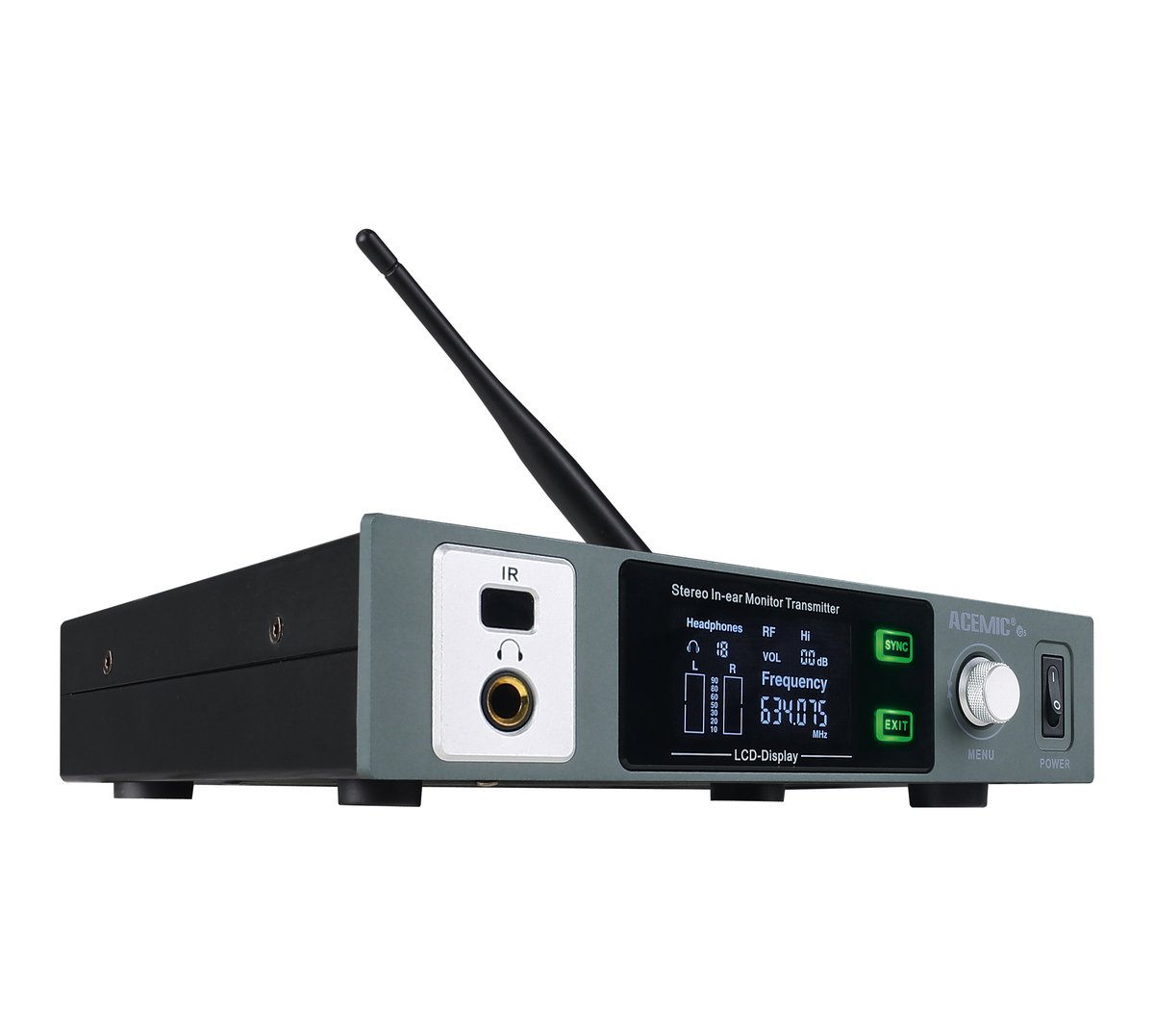
ACEMIC G5: One Platform, Three Stage Sizes
The G5 line scales with the act instead of forcing you to re-buy a protocol you will outgrow.
Solo acts, duos, and small bands: the single-channel G5
One stereo transmitter and one bodypack cover a singer-instrumentalist or a duo where both players share a mix. Set the transmitter at the mixer, sync the bodypack over IR, and the whole rig is on the air in minutes. If a second player later needs an independent mix, add a second transmitter on a nearby channel — the system was designed for frequency coordination, not against it.
Full bands: multiple stereo mixes
A four-piece band typically runs two to four G5 transmitter channels, one per independent mix, each feeding one or more bodypacks tuned to it. Because bodypacks can share a frequency, the bassist and the drummer who want identical mixes can listen to the same channel without doubling hardware.

Churches, theaters, and rental houses: the rack system
When many mixes run side by side, antenna chaos becomes the real problem — every transmitter with its own whips in a metal rack degrades reception. The G5 rack configuration solves this properly: four stereo transmitters and eight bodypack receivers mounted in a road case, fronted by the AC-100 UHF antenna combiner with front-mounted BNC outputs, and a directional AC-120 log-periodic antenna on a stand covering the whole stage from one point. That is one antenna, eight clean receivers, and a case that rolls from truck to stage.

Wedges vs Wired vs Wireless In-Ears: The Real Trade-Offs
| Wedge monitors | Wired IEM | Wireless IEM (ACEMIC G5) | |
|---|---|---|---|
| Feedback risk | High — open mics face speakers | None | None |
| Stage volume | Keeps climbing | Drops sharply | Drops sharply |
| Mobility on stage | Free | Tethered to a cable | Free across the venue footprint |
| Mixes per system | One mix per wedge zone | One per headphone run | Two channels per frequency; packs can share |
| Cabling / setup time | Amps, looms, stands | Long headphone runs | One transmitter feed + one antenna |
| Hearing protection | None | Excellent | Excellent |
| Best for | One-off small gigs | Fixed studio or podcast desk | Touring bands, churches, venues, installs |
Five Checks Before You Buy a Wireless IEM System
1. Frequency legality and coordination
IEM links live in UHF spectrum, and every country assigns it differently. The G5's LCD makes the tuned channel obvious (units in the field display frequencies such as 627.400 or 680.00 MHz), but you are responsible for picking legal, interference-free channels for your region — check local rules before a tour, and space multiple transmitters away from each other's image frequencies.
2. Stereo, not mono
Mono-only budget packs throw away the pan-blend workflow described above. Insist on true stereo transmission with a stereo headphone output on the bodypack; it is the difference between "a mix" and "my mix".
3. Battery reality
The G5 bodypack runs on a rechargeable lithium battery pack, which ends the nightly AA churn and the "who has spares" ritual. Confirm charging logistics: a charged spare per player covers double-show days. (See what ships in the complete stereo IEM package.)
4. Antenna plan for multi-channel rigs
Two transmitters can coexist on their own whips; four or more need an antenna distribution setup like the AC-100 combiner plus AC-120 directional antenna, which also extends reliable coverage across a large stage or sanctuary.
5. Expansion path
Buy a system whose bodypacks can share channels and whose transmitters coordinate. The path from one pack to eight in the same G5 family is the reason rental houses standardize on it.
Wireless In-Ear Monitor System FAQ
Can one transmitter feed more than one musician?
Yes. Any number of bodypacks tuned to the same frequency hear the same stereo mix, which is how the G5 rack configuration serves eight players from four transmitters while leaving headroom for individual mixes.
Is the G5 system stereo?
Yes — the transmitter accepts a stereo feed, broadcasts it in stereo, and the bodypack delivers it to both earpieces with a local pan/volume control, so each player can blend two sources in real time.
What frequency range do these systems use?
The G5 family operates in the UHF band, with each unit's display showing its exact tuned frequency. UHF handles bodypack use far better than crowded 2.4 GHz bands, but always confirm the specific channels you select are permitted in your country before broadcast.
How is the bodypack powered?
By a built-in rechargeable lithium battery (2200 mAh class), recharged between sessions — no disposable batteries to buy, carry, or half-recycle.
Do I still need a wedge for the drummer?
Almost never. Drummers benefit most from in-ears because of the click track and hearing protection. If a player genuinely needs room feel, a single low-level side-fill is cheaper than rebuilding the whole monitor rig.
Ready to put your mix in your ears? Browse the full wireless in-ear monitor collection, compare the wireless microphone systems and stage microphone setups that pair with it, or read every guide in one place at the ACEMIC buying guides index. Dealers and OEM buyers: contact us for wholesale and OEM terms.
← All buying guides & technical articles
Published: 2026-11-18 · ACEMIC Audio · Live version on acemic.store